
31 Jul 2026 · 21 min read
Hermes - The Second Brain
My practical setup for using Hermes across a cloud-hosted VPS gateway and a local gateway: scheduled checks, Telegram, Obsidian, browser automation, memory, and developer workflows.
contents
- 01What Hermes is in one sentence
- 02The core idea: chat is only the interface
- 03My setup at a glance
- 04Why my local gateway does more than my VPS gateway
- 05The daily-driver loop
- 06Obsidian is my durable layer
- 07Skills make Hermes less random
- 08Memory has three jobs, not one
- 09MCP is how I expand Hermes without custom glue everywhere
- 10Cron turns repeated responsibilities into systems
- 11How I use Hermes for software projects
- 12How I use Hermes for research and learning
- 13How I use Hermes for social content without becoming a spam machine
- 14Where image generation fits
- 15A practical starter setup for other people
- 16What Hermes is good for as a developer daily driver
- 17What not to automate blindly
- 18My current mental model
- 19Final takeaway
This is my real setup as of July 2026: the jobs, dashboards, tools, and screenshots below come from the gateways and workspace I use day to day. It will evolve, but the operating model is the part I expect to keep.
I do not use AI as a replacement for thinking. I use Hermes to make my thinking durable, searchable, automatable, and easier to turn into real work.
Hermes Agent has slowly become more than a chatbot in my workflow. It is the layer between my ideas, my notes, my terminal, my browser, my servers, my study routine, and the small automations that keep my work from disappearing.
The simplest way to explain it is this:
- my VPS gateway is the always-on remote assistant: messaging, server checks, uptime, backups, and alerts;
- my local gateway is the high-leverage automation environment: browser control, local files, Obsidian, coding agents, MCP tools, screenshots, link previews, image generation, research, and project memory;
- Obsidian + ContextSync + Hermes memory are the durable context layers;
- cron jobs turn repeated responsibilities into scheduled routines;
- I stay the decision maker, reviewer, and person responsible for what gets shipped.
This article is my attempt to make the setup understandable as a one-stop guide: what Hermes is, how it works, why local and VPS gateways are different, how I use it every day, and how developers or non-developers can build a similar daily-driver workflow.
What Hermes is in one sentence
Hermes Agent is a tool-using AI agent that can run across desktop, terminal, messaging apps, scheduled jobs, and integrations while carrying persistent memory, reusable skills, and access to real tools.
It is not only a chat UI. It can:
- read and write files;
- run terminal commands;
- search and extract web pages;
- control a browser when needed;
- generate and analyze images;
- use MCP servers as extra tools;
- remember durable preferences and environment facts;
- load skills, which are reusable procedures for recurring tasks;
- run scheduled jobs through the gateway;
- continue work from past sessions;
- deliver results through desktop, CLI, Telegram/Discord/Slack/other messaging surfaces depending on setup.
That combination changes the mental model. Instead of opening a new chat and pasting all context every time, I can treat Hermes like a persistent operating layer around my work.
The core idea: chat is only the interface
The visible chat window is not the real system. The real system is the loop between context, tools, durable notes, automation, and review.
flowchart TD
    A[Idea, task, question, bug, server alert, or daily signal] --> B[Hermes Agent session]
    B --> C[Persistent memory]
    B --> D[Relevant skills]
    B --> E[Session history search]
    B --> F[Tools]
    F --> G[Terminal]
    F --> H[Files]
    F --> I[Browser]
    F --> J[Web research]
    F --> K[Image / media tools]
    F --> L[MCP servers]
    B --> M[Human review]
    M --> N[Decision]
    N --> O[Obsidian source of truth]
    O --> P[Project docs, logs, summaries, drafts, checklists]
    P --> B
A normal chatbot answers inside the conversation. Hermes can turn the conversation into an action: a note, a file, a test run, a scheduled reminder, a repo inspection, a browser check, a diagram, or a draft.
That is why I call it a developer operating system. Not because it replaces macOS, Linux, or a VPS. It becomes the coordination layer above them.
My setup at a glance
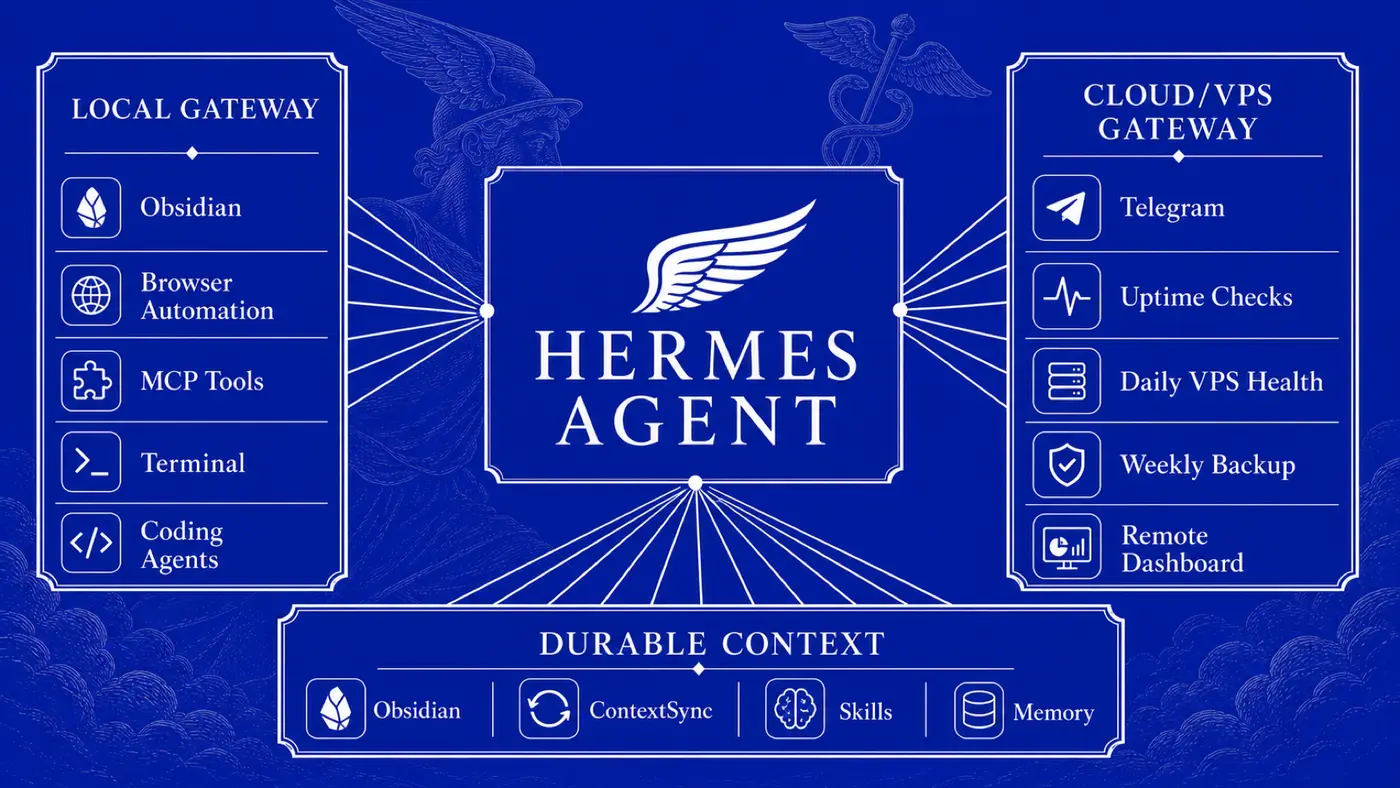
My workflow has two gateways with different jobs.
flowchart LR
    subgraph Human[Me]
        Phone[Phone / Telegram]
        Desktop[Hermes Desktop]
        CLI[Terminal / CLI]
    end

    subgraph Local[Local Gateway: high-automation environment]
        LG[Hermes local gateway]
        Files[Local files]
        Vault[Obsidian vault]
        Browser[Playwright / Chrome DevTools]
        Images[Image generation]
        Agents[Codex / Claude Code / other coding agents]
        MCP[MCP servers]
    end

    subgraph VPS[VPS Gateway: always-on remote operations]
        VG[Hermes VPS gateway]
        Uptime[Uptime checks]
        Backups[Backups]
        ServerHealth[Server health]
        RemoteAlerts[Remote alerts]
    end

    subgraph Durable[Durable context]
        Memory[Hermes memory]
        Skills[Skills]
        ContextSync[ContextSync project memory]
        Git[Git + GitHub sync]
    end

    Phone --> VG
    Phone --> LG
    Desktop --> LG
    CLI --> LG

    LG --> Files
    LG --> Vault
    LG --> Browser
    LG --> Images
    LG --> Agents
    LG --> MCP

    VG --> Uptime
    VG --> Backups
    VG --> ServerHealth
    VG --> RemoteAlerts

    LG --> Memory
    LG --> Skills
    LG --> ContextSync
    Vault --> Git
    ContextSync --> LG
    Memory --> LG
    Skills --> LG
The difference matters.
| Layer | What I use it for | Why it exists |
|---|---|---|
| Local Hermes gateway | Heavy automation, browser work, Obsidian edits, local files, MCP tools, image generation, coding workflows, project memory | It has access to my real working environment and can automate much more than a remote server should |
| VPS Hermes gateway | Always-on messaging, uptime checks, backups, server health, remote alerts | It stays available even when my laptop is closed or I am away |
| Obsidian | Human-readable source of truth | I do not want important work trapped inside chat history |
| Hermes memory | Stable preferences, environment facts, recurring conventions | New sessions start with orientation instead of a blank page |
| ContextSync MCP | Project-scoped handoff memory across agents | Local agents and scheduled workflows can share concise project state |
| Skills | Reusable procedures | The assistant follows proven workflows instead of improvising every time |
| Cron | Scheduled routines | Important work does not depend on me remembering to ask |
Why my local gateway does more than my VPS gateway
At first, it is tempting to think the VPS gateway should do everything because it is always on. In practice, I split the work because the two machines have different trust boundaries and capabilities.
The VPS gateway is excellent for tasks like:
- checking service uptime;
- summarizing server health;
- reminding me about backups;
- delivering alerts to messaging apps;
- running lightweight scheduled jobs;
- acting as a stable remote entry point.
The cloud-hosted/VPS gateway is also where the Hermes dashboard becomes useful as a control surface. From the hosted dashboard I can see sessions, models, cron jobs, logs, files, skills, plugins, MCP, channels, webhooks, pairing, profiles, config, and keys. In the screenshot I shared, the dashboard is running at hermes.monostack.in, Telegram is connected, the gateway status is running, and the sessions page shows roughly 1,392 sessions and 19,347 messages with recent uptime-check sessions using gpt-5.6-luna.
The cloud dashboard is not just a status page. It is how I inspect what the always-on gateway is doing.
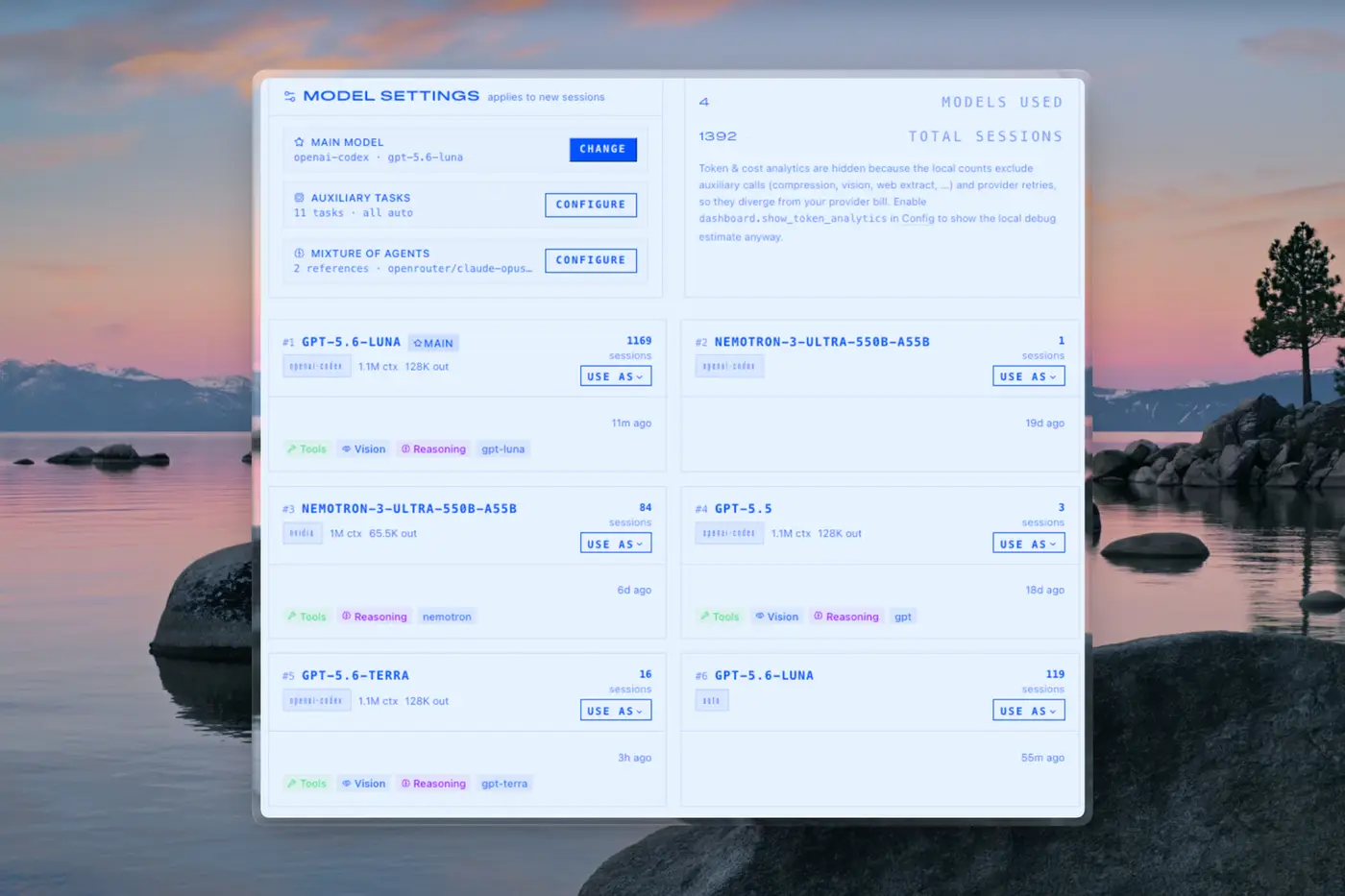
The model page shows how much of my remote usage is powered by gpt-5.6-luna: it is the main model through openai-codex, with tool, vision, and reasoning support. The same dashboard also shows other models I have used, including nemotron-3-ultra-550b-a55b, gpt-5.5, and gpt-5.6-terra. That matters because Hermes is not locked to one model personality. I can use one model for normal operations, another for heavier reasoning, and keep the history visible.
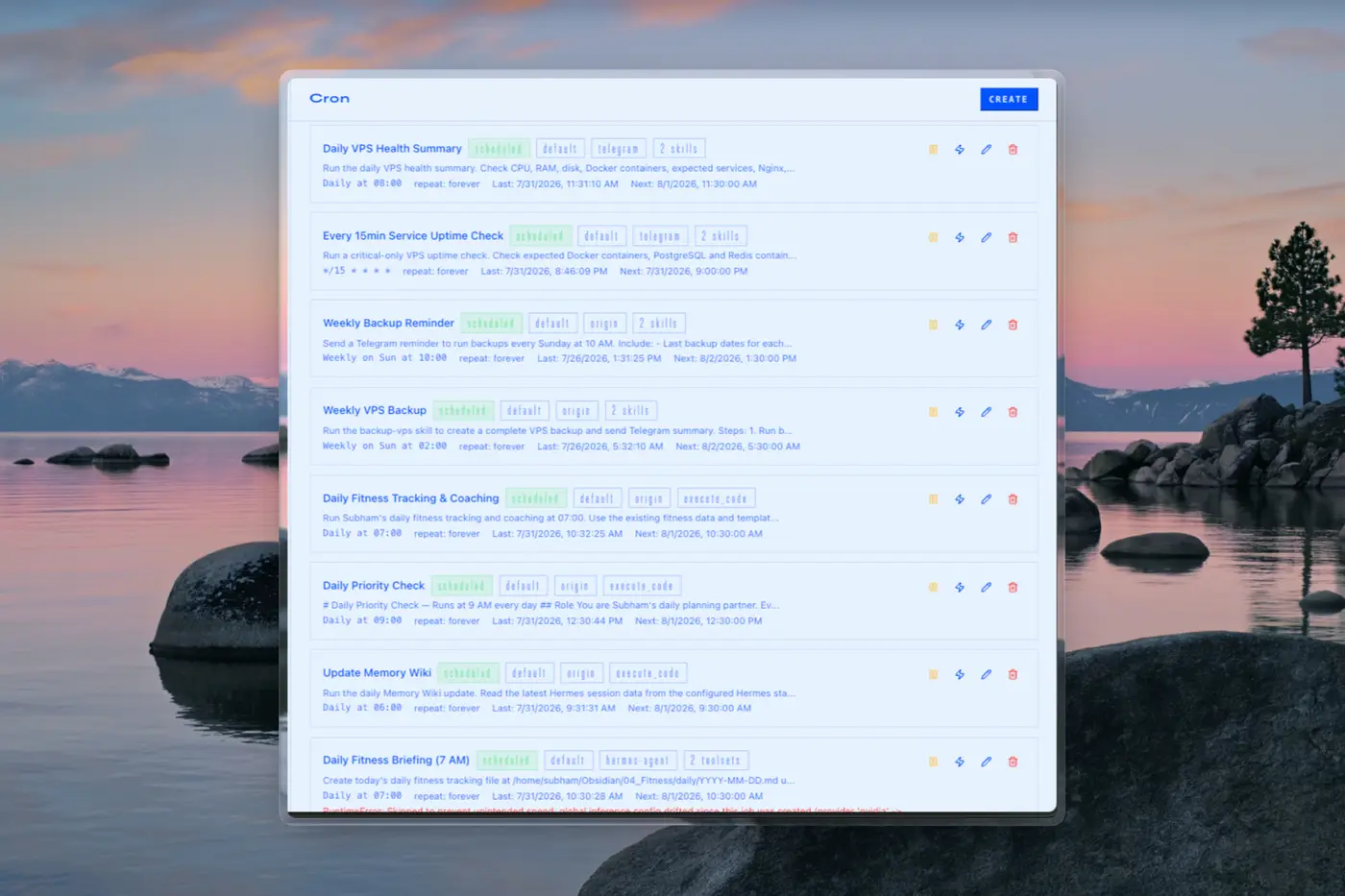
The cron page is where the VPS gateway feels like infrastructure. Visible jobs include:
- Daily VPS Health Summary;
- Every 15min Service Uptime Check;
- Weekly Backup Reminder;
- Weekly VPS Backup;
- Daily Fitness Tracking & Coaching;
- Daily Priority Check;
- Update Memory Wiki;
- Daily Fitness Briefing.
This is why the cloud gateway is useful even when the local gateway is more powerful. The VPS does not need access to every local file or browser session. It needs to be reliable, scheduled, and reachable.
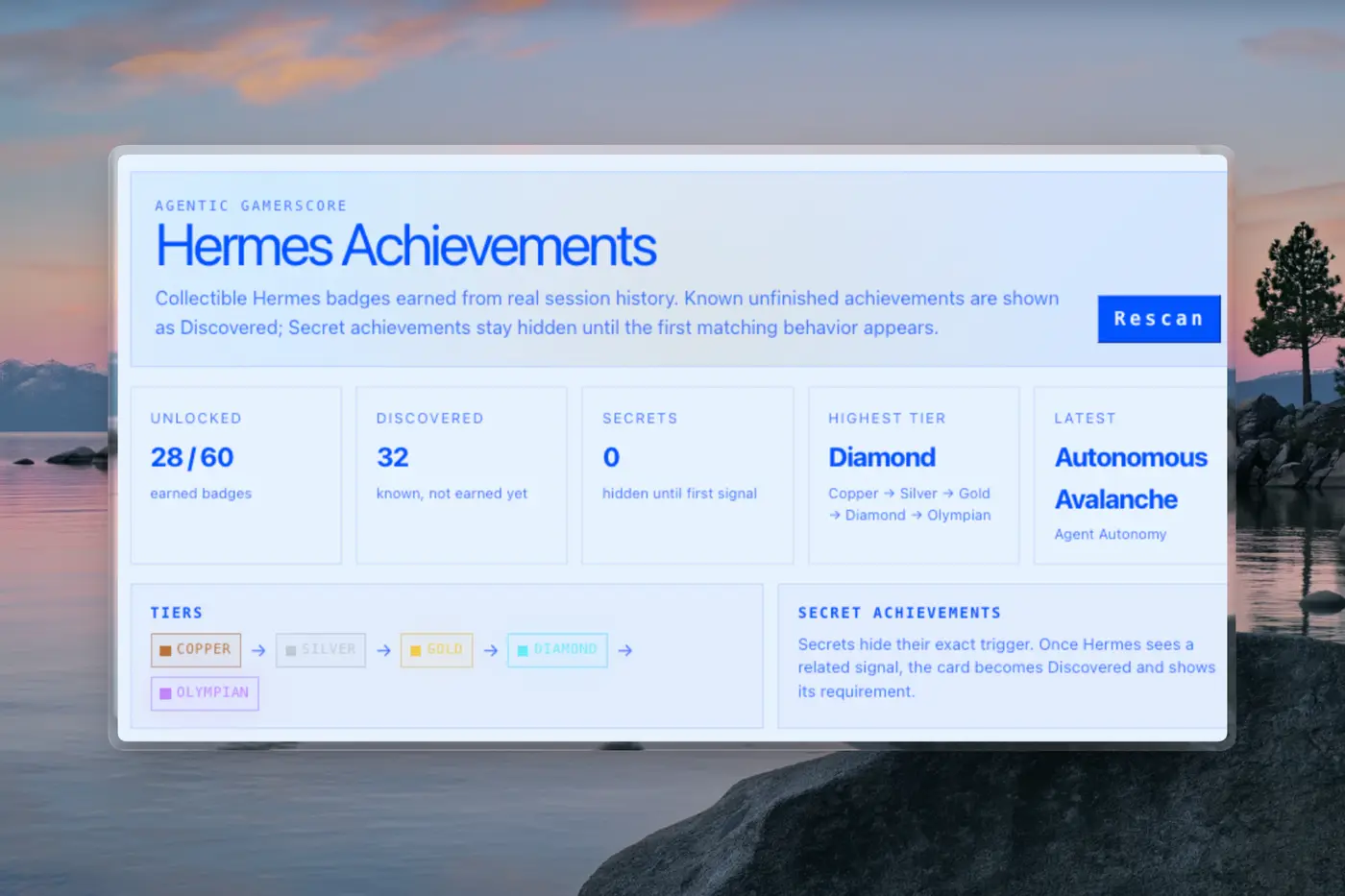
The achievements screen is a small detail, but I like it because it makes long-term usage visible. It shows progress from real session history: 28/60 unlocked, 32 discovered, Diamond as the highest tier, and the latest badge as Autonomous Avalanche. It is not the core feature, but it reinforces the same idea: Hermes is meant to grow with usage, not stay as a blank chatbot.
The local gateway is better for tasks that need my real machine:
- editing my Obsidian vault directly;
- inspecting local project folders;
- using local browser automation;
- using Chrome DevTools against real pages;
- generating screenshots and visual assets;
- calling local MCP servers;
- coordinating local coding agents;
- using ContextSync with local project paths;
- turning my actual daily workspace into structured notes.
So I do not treat the VPS as the brain and the laptop as a dumb client. I treat the VPS as the always-on nervous system and the local gateway as the automation workstation.
flowchart TB
    Q[Should this task run locally or on VPS?] --> R{Needs local files, browser, Obsidian, desktop, or project paths?}
    R -->|Yes| L[Run through local gateway]
    R -->|No| S{Needs to be always-on or alert me remotely?}
    S -->|Yes| V[Run through VPS gateway]
    S -->|No| C[Either gateway is fine]

    L --> L1[Heavy automation]
    L --> L2[Research + browser inspection]
    L --> L3[Vault/documentation updates]
    L --> L4[Agent handoffs]

    V --> V1[Uptime checks]
    V --> V2[Backups]
    V --> V3[Server health]
    V --> V4[Remote messaging]
That split has made the system more reliable. I do not over-permission the server, and I do not force always-on duties onto my laptop.
The daily-driver loop
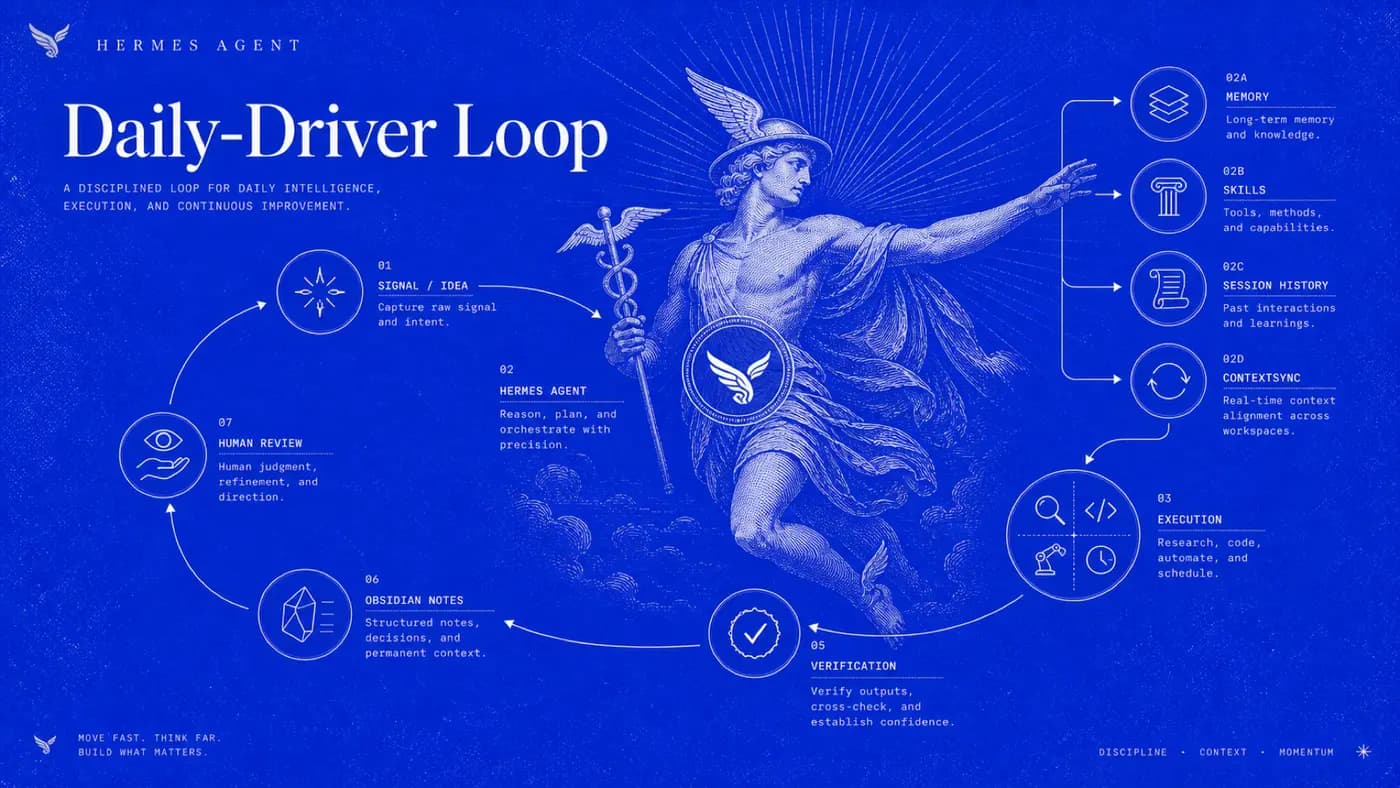
A typical Hermes-powered workflow has five stages.
flowchart LR
    A[Capture] --> B[Context]
    B --> C[Action]
    C --> D[Verification]
    D --> E[Durable record]
    E --> F[Review / next step]
    F --> A
In real life, that looks like this:
flowchart TD
    Start[Signal: idea, bug, class topic, trend, message, server alert] --> Hermes[Open Hermes]
    Hermes --> Context[Load memory, skills, session history, ContextSync]
    Context --> Decide{What kind of work is this?}

    Decide --> Research[Research / compare / extract sources]
    Decide --> Build[Inspect repo / run code / use coding agent]
    Decide --> Automate[Create or adjust scheduled routine]
    Decide --> Draft[Draft note, post, email, plan, or doc]

    Research --> Evidence[Links, notes, screenshots, trade-offs]
    Build --> Checks[Tests, lint, diff, logs, working artifact]
    Automate --> Schedule[Cron job or alert workflow]
    Draft --> HumanReview[Human review]

    Evidence --> Obsidian[Obsidian vault]
    Checks --> Obsidian
    Schedule --> Obsidian
    HumanReview --> Obsidian

    Obsidian --> Next[Next action, project decision, or public draft]
The key rule is simple: Hermes can accelerate execution, but an agent message is not proof of completion.
For engineering work, proof means something like:
- tests passed;
- build completed;
- relevant file changed;
- screenshot captured;
- source link saved;
- diff reviewed;
- decision documented;
- output exists in Obsidian or Git.
This is the difference between using an AI agent as a serious workflow tool and using it as a confidence generator.
Obsidian is my durable layer
Every useful output needs a home. My home is Obsidian.
My vault is organized by purpose:
01_Inbox       Raw ideas, temporary notes, links, and captures
02_Ideas       Product concepts, experiments, and early exploration
03_Summaries   Daily, weekly, meeting, and conversation summaries
04_Fitness     Training, nutrition, body metrics, and coaching logs
05_Resources   Research material, papers, links, and references
06_Docs        PRDs, architecture, technical decisions, and project docs
07_Logs        Development, learning, build, and deployment logs
08_Archives    Completed or superseded work
09_Memos       Commands, references, cheatsheets, and snippets
10_VPS         Infrastructure notes and operational records
11_Academics   Course material, study notes, and learning paths
12_Projects    Active learning and software projects
13_Excalidraw  Architecture diagrams and visual thinking
14_Blogs       Long-form writing and public-facing documentation
99_Memory      Persistent personal and project context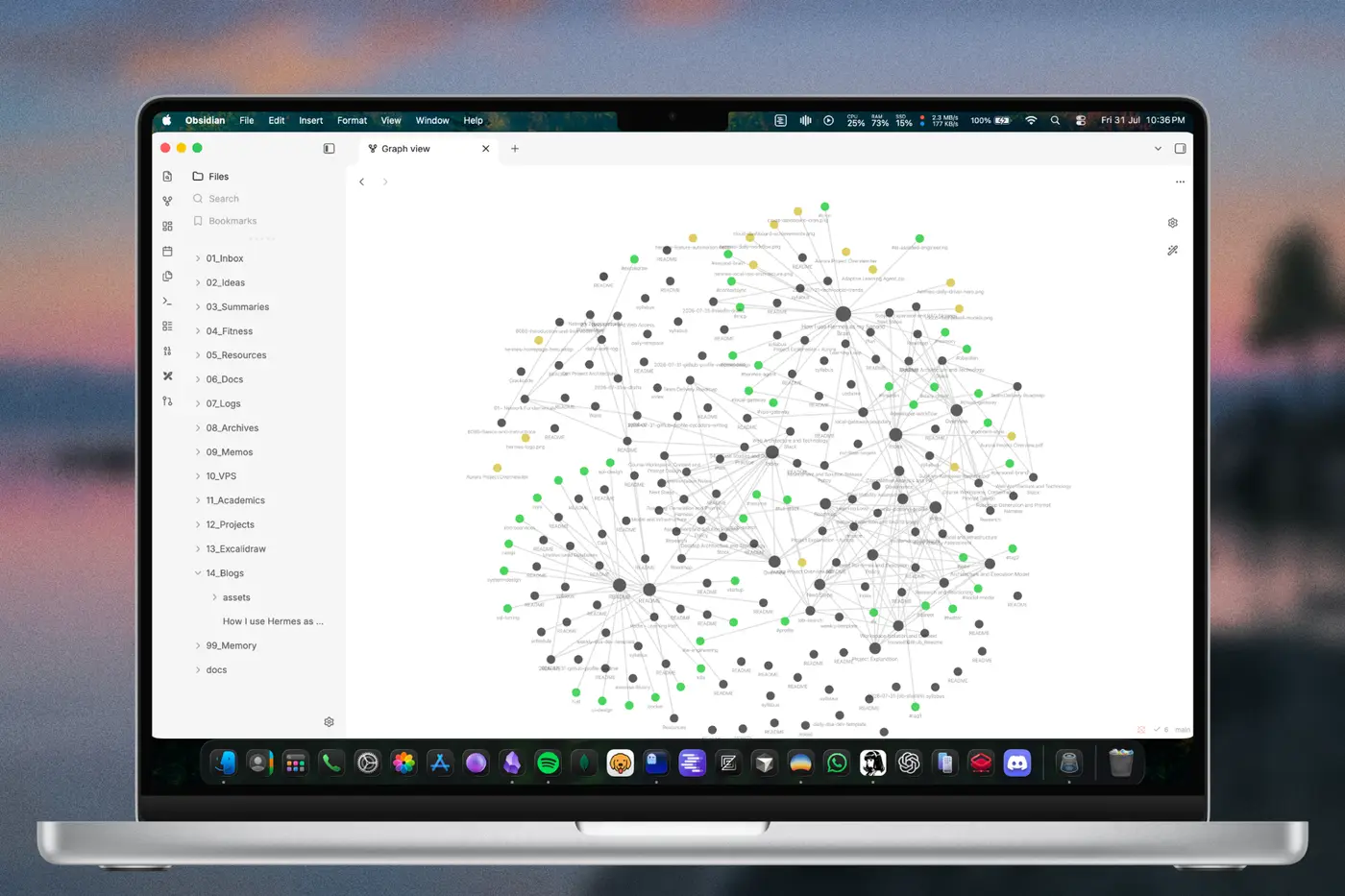
The point is not to create a beautiful folder tree. The point is to make sure work can move from rough to durable:
flowchart LR
    Inbox[Quick capture] --> Triage[Evening / scheduled triage]
    Triage --> Idea[Idea note]
    Triage --> Project[Project workspace]
    Triage --> Log[Daily log]
    Triage --> Archive[Archive / discard]
    Project --> Docs[PRD, architecture, decisions]
    Docs --> Build[Implementation]
    Build --> Logs[Dev logs + verification]
    Logs --> Blog[Public writing / portfolio proof]
Without this layer, AI work becomes a pile of chats. With this layer, a conversation can become documentation, a plan, a changelog, or a public article.
Skills make Hermes less random
A skill is a reusable procedure. It tells Hermes how a type of work should be done here.
That matters because I do not want to explain the same preferences every time:
- how to inspect a codebase;
- how to write a plan;
- how to debug systematically;
- how to update Obsidian safely;
- how to handle GitHub workflows;
- how to write X or LinkedIn drafts in my voice;
- how to use Hermes docs correctly;
- how to use my local MCP gateway.
For example, when I ask for a code review, I do not want a generic response like “looks good.” I want it to inspect the diff, check security risks, run relevant tests where possible, and separate blocking issues from suggestions.
flowchart TD
    Task[User task] --> SkillMatch{Relevant skill?}
    SkillMatch -->|Yes| Load[Load skill]
    SkillMatch -->|No| Basic[Use normal tools]
    Load --> Procedure[Follow known workflow]
    Procedure --> Tools[Use files / terminal / web / browser]
    Tools --> Verify[Verify output]
    Verify --> Improve{Skill missing a pitfall?}
    Improve -->|Yes| Patch[Patch the skill]
    Improve -->|No| Done[Done]
This is one of the strongest parts of Hermes as a daily driver: it does not only remember facts, it can remember ways of working.
Memory has three jobs, not one
I split memory into layers because one giant memory bucket becomes messy quickly.
flowchart TB
    subgraph Orientation[Orientation memory]
        HM[Hermes memory\nStable preferences, environment facts, conventions]
    end

    subgraph Project[Project handoff memory]
        CS[ContextSync MCP\nCurrent blockers, decisions, next steps per project]
    end

    subgraph Source[Human-readable source of truth]
        OB[Obsidian\nDocs, logs, research, drafts]
        Git[Git / GitHub history]
    end

    HM --> Session[New Hermes session]
    CS --> Session
    OB --> Session
    Git --> Session
    Session --> OB
Session --> CS- Hermes memory should hold compact, durable facts: preferences, stable environment details, recurring conventions.
- ContextSync should hold project-scoped handoff context: what is blocked, what changed, what should be tried next.
- Obsidian should hold the readable source of truth: decisions, research, logs, architecture, plans, drafts.
This prevents the agent from treating every past detail as permanent memory while still giving it enough context to avoid repeatedly asking the same setup questions.
MCP is how I expand Hermes without custom glue everywhere
MCP, the Model Context Protocol, lets Hermes connect to external tool servers and expose those tools inside the agent.
My current local MCP stack is practical, not random:
| MCP server | Role in my workflow |
|---|---|
tavily-remote | Broad current web search and discovery |
firecrawl | Deeper extraction, scraping, crawling, parsing, monitoring |
opengraph | Metadata, link previews, screenshots, markdown, social-card checks |
playwright | Browser automation for interactive/dynamic pages |
chrome-devtools | Console, network, Lighthouse, performance, debugging |
contextsync | Project-scoped cross-agent memory backed by local SQLite |
The important part is that each MCP has a job.
flowchart LR
    Hermes[Hermes Agent] --> Tavily[Tavily\nFind signals]
    Hermes --> Firecrawl[Firecrawl\nExtract pages]
    Hermes --> OG[OpenGraph\nPreview links]
    Hermes --> Playwright[Playwright\nInteract with sites]
    Hermes --> DevTools[Chrome DevTools\nDebug pages]
    Hermes --> ContextSync[ContextSync\nProject memory]

    Tavily --> Research[Research digest]
    Firecrawl --> Research
    OG --> Publishing[Social/blog readiness]
    Playwright --> QA[Browser QA]
    DevTools --> QA
    ContextSync --> Handoff[Agent handoff]
This is especially useful for trend digests and public writing. A daily tech digest should not be one generic search. It should combine discovery, extraction, link inspection, and durable notes.
Cron turns repeated responsibilities into systems
A second brain is only useful when it works without me manually remembering every step.
Hermes cron jobs let me schedule recurring routines. In my current setup, I use scheduled jobs for things like:
- daily tech and agentic systems trend digests;
- X learning update drafts;
- LinkedIn engineering reflection drafts;
- Gmail cleanup;
- inbox review and prioritization workflows;
- local or VPS health checks depending on the task.
The pattern is:
sequenceDiagram
    participant Clock as Schedule
    participant Hermes as Hermes cron session
    participant Skills as Attached skills
    participant Tools as Tools / MCP / terminal / web
    participant Vault as Obsidian
    participant Me as Subham

    Clock->>Hermes: Run due job
    Hermes->>Skills: Load self-contained workflow
    Hermes->>Tools: Collect/check/inspect
    Tools-->>Hermes: Evidence
    Hermes->>Vault: Save durable output when useful
    Hermes->>Me: Notify only when useful
For alerts, silence is a feature. I do not need “everything is fine” messages every few minutes. I need useful output when something changes, fails, or needs my decision.
How I use Hermes for software projects
For projects, Hermes helps me slow down the thinking and speed up the repetitive execution.
A project starts as a question, not a codebase.
flowchart TD
    Idea[Product idea] --> Capture[Capture in Obsidian]
    Capture --> Research[Research user pain, alternatives, constraints]
    Research --> Risks[Document assumptions and risks]
    Risks --> Architecture[Architecture options]
    Architecture --> Scope[MVP scope]
    Scope --> Brief[Agent-ready implementation brief]
    Brief --> CodingAgent[Codex / Claude Code / implementation agent]
    CodingAgent --> Verify[Tests, build, diff, review]
    Verify --> Docs[Update docs and logs]
    Docs --> Ship{Ready?}
    Ship -->|No| Iterate[Revise scope or implementation]
    Ship -->|Yes| Public[Demo, README, blog, portfolio proof]
I use Hermes to create and maintain:
- PRDs;
- vision docs;
- architecture notes;
- implementation plans;
- trade-off analysis;
- security notes;
- data-model notes;
- acceptance criteria;
- coding-agent briefs;
- test and review checklists;
- dev logs.
When the project moves to coding, Hermes can hand curated context to Codex or Claude Code instead of giving them a vague prompt. That is a huge difference. The agent receives a workspace, constraints, acceptance criteria, and current decisions.
How I use Hermes for research and learning
For study, Hermes is not a shortcut around learning. It is a structure around learning.
A typical study loop looks like:
flowchart LR
    Topic[Topic or syllabus] --> Plan[Learning plan]
    Plan --> Resources[Resources and examples]
    Resources --> Study[Study + exercises]
    Study --> Debug[Ask Hermes for explanations/debugging]
    Debug --> Log[Log what I learned]
    Log --> Revision[Revision prompts later]
    Revision --> Topic
For coursework, DSA, databases, Python, and AI engineering, Hermes helps me:
- break topics into learning paths;
- explain concepts from multiple angles;
- generate small practice projects;
- debug code while I still do the thinking;
- turn scattered notes into revision material;
- connect learning to real projects.
The value is not “AI gave me an answer.” The value is that my learning progress becomes visible and reviewable.
How I use Hermes for social content without becoming a spam machine
I use Hermes to collect ideas and draft posts, not to auto-post without review.
flowchart TD
    Signals[Daily signals: trends, project logs, study notes] --> Digest[Tech trend digest]
    Digest --> Ideas[Post idea backlog]
    Ideas --> Select[Human selects angle]
    Select --> Drafts[Hermes drafts X / LinkedIn variants]
    Drafts --> Edit[Human edit and verification]
    Edit --> Approve{Approved?}
    Approve -->|No| Archive[Archive or revise]
    Approve -->|Yes| Publish[Manual or approved integration action]
For X, I want informal build-log style: what I tried, what broke, what I learned, what I am building.
For LinkedIn, I want professional but personal writing: first-person, grounded in my actual week, relatable to students/builders, and connected to AI-native full-stack engineering.
Hermes helps transform raw context into options. I still decide what is true, useful, and worth publishing.
Where image generation fits
For this blog update, I used Hermes’ built-in image-generation route through the OpenAI Codex-backed image provider, with the Hermes chat session running on gpt-5.6-luna. I intentionally did not use the OpenGraph image-generation MCP for these assets.
I also regenerated the main visuals against the official Hermes Agent homepage style: cobalt blue and white, editorial serif type, classical Hermes/radiating line motifs, and the official Hermes logo/wordmark as reference material from hermes-agent.nousresearch.com. The goal was to make the images feel like they belong to the Hermes visual system instead of looking like generic neon AI-dashboard art.
The images are not decoration only. They make the system easier to understand:
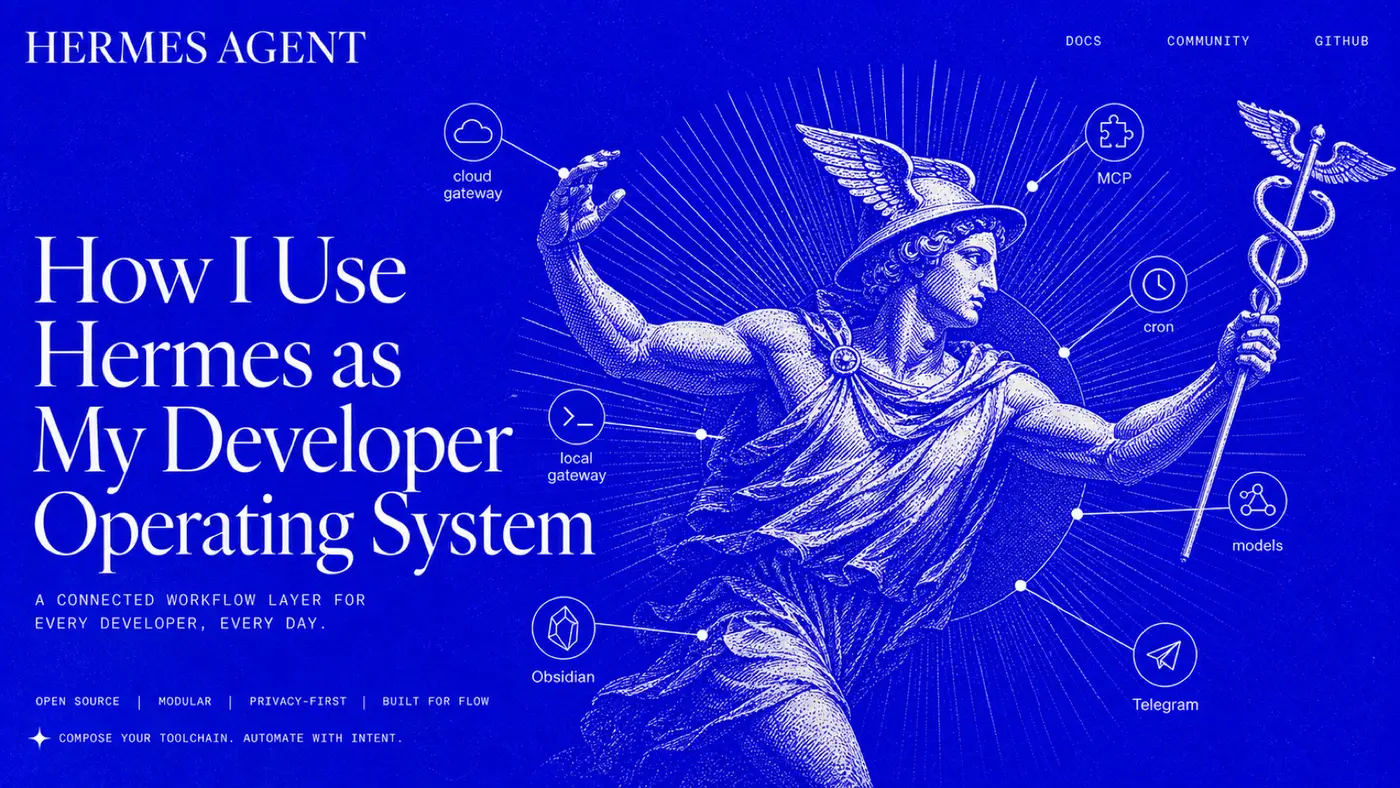
- the hero image gives the reader the mental model;
- the architecture image explains local gateway vs VPS gateway;
- the workflow image explains the daily-driver loop.
A good technical blog should not force readers to reverse-engineer the setup from paragraphs alone. Diagrams and images reduce cognitive load.
A practical starter setup for other people
If someone wants to start using Hermes as a daily driver, I would not suggest copying my full setup on day one.
Start with this ladder:
flowchart TD
    S1[Step 1: Install Hermes and run setup] --> S2[Step 2: Use desktop or CLI for normal tasks]
    S2 --> S3[Step 3: Add Obsidian or another durable notes folder]
    S3 --> S4[Step 4: Save stable preferences to memory]
    S4 --> S5[Step 5: Add skills for recurring workflows]
    S5 --> S6[Step 6: Add one cron job]
    S6 --> S7[Step 7: Add MCP tools only when needed]
    S7 --> S8[Step 8: Split local vs VPS responsibilities]
Day 1: make it useful
- Install Hermes.
- Configure a model provider.
- Use it from desktop or CLI.
- Ask it to help with one real task: summarize a repo, draft a note, debug an error, or organize an idea.
Day 2: make it durable
- Create a notes folder or Obsidian vault.
- Ask Hermes to save useful outputs there.
- Start writing project notes and daily logs.
Day 3: make it repeatable
- Add skills for tasks you repeat.
- Use cron for one simple routine: daily planning, weekly review, or morning digest.
Later: make it powerful
- Add MCP servers for web research, browser automation, GitHub, databases, or internal tools.
- Add a VPS gateway for always-on messaging and alerts.
- Keep local automation on the local gateway where it has access to your real working environment.
What Hermes is good for as a developer daily driver
Hermes is especially useful for:
| Use case | What Hermes can do |
|---|---|
| Codebase understanding | Inspect files, summarize structure, find entry points, identify risks |
| Debugging | Reproduce symptoms, inspect logs, run commands, test hypotheses |
| Project planning | Turn ideas into PRDs, architecture, phases, acceptance criteria |
| Documentation | Maintain README, docs, decision records, dev logs |
| Research | Search, extract, compare, cite sources, save summaries |
| Browser QA | Interact with dynamic pages, inspect console/network issues |
| DevOps | Check services, ports, logs, backups, uptime, deployment notes |
| Learning | Create learning plans, exercises, revision notes |
| Content | Turn real project logs into X/LinkedIn/blog drafts |
| Personal ops | Fitness logs, routines, reminders, planning, inbox processing |
The value is not that Hermes does one of these magically. The value is that one agent can coordinate many of them with memory and durable outputs.
What not to automate blindly
The most important part of using Hermes well is knowing what not to delegate fully.
I do not want blind automation for:
- production-destructive actions;
- publishing posts without approval;
- sending emails/DMs without review;
- deleting or rewriting important files without verification;
- applying to jobs automatically;
- treating scraped web data as truth;
- merging code because an agent says it is done.
My rule is:
flowchart LR
    Agent[Agent output] --> Evidence{Evidence exists?}
    Evidence -->|No| NotDone[Not done]
    Evidence -->|Yes| Review{Human review needed?}
    Review -->|Yes| Human[Human decision]
    Review -->|No| Accept[Accept / archive / continue]
Automation should reduce friction, not remove responsibility.
My current mental model
Hermes is not “the AI that answers me.” It is closer to:
Hermes = chat interface
       + tool runner
       + local automation worker
       + VPS alert worker
       + scheduler
       + memory
       + skills
       + Obsidian writer
       + research assistant
       + coding coordinator
       + verification nagger
The magic is not any one piece. The magic is that they are connected.
Final takeaway
The biggest improvement Hermes gives me is continuity.
An idea can become a note. A note can become research. Research can become a plan. A plan can become an implementation brief. A coding session can become a verified change. A conversation can become a searchable memory. A repeated responsibility can become a quiet scheduled routine. A weekly build log can become a public post.
That is why I use Hermes as a daily driver.
Not because I want AI to think for me, but because I want fewer useful thoughts to be lost, fewer workflows to depend on memory, and fewer projects to die inside scattered chats.
Hermes gives my work a place to go, a structure to grow in, and a trail I can follow back.
This document describes my current Hermes workflow as of July 2026. It is intentionally a living system: the gateways, skills, MCP servers, automations, and project process will keep changing as I learn what produces better work.